
6Utilities
Option 4Generate Variable Budgets
This function allows you to generate specific budget records according to their definition in the Variable Budgets file. You must specify what budgets are being generated and for what period or periods of time. A list of modifications is provided to identify which budgets were changed. The following processing steps accomplish this job.
- Step 1This function allows you to enter parameters for generating one or more budgets, according to the definitions entered into the Variable Budgets file. The necessary parameters include the month(s) and/ or year of budgets to be generated and the time period (month(s) and/or year) that is to be used as a basis for the variable budget computations. For example, the basis for the 1990 budget might be 1989, or the basis for third quarter fiscal 1990 budget might be the second quarter of fiscal 1990.
The screen shown below allows you to enter parameters needed by the Generate Variable Budgets utility.
Generate Variable Budgets screen
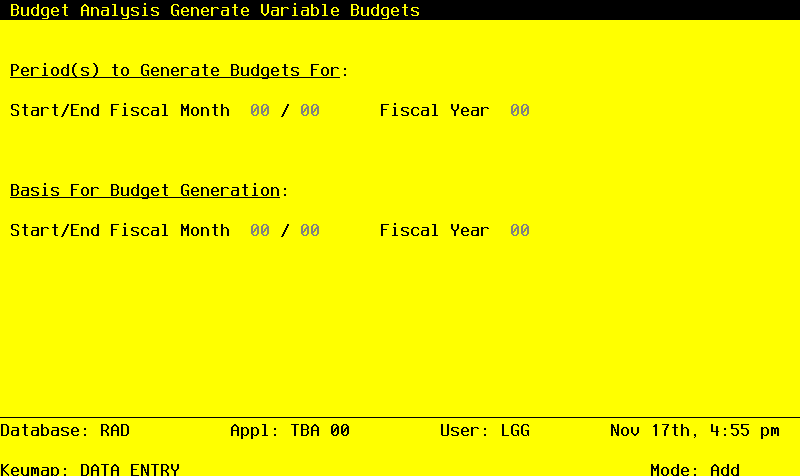
Data items for the preceding screen are described below:
- Start/End Fiscal Month
Positive number, up to 2 digits
Identify the first and last month (or period) and year in the range for which you want variable budgets to be generated. For example, if you want to generate variable budget records for all of fiscal year 1990, enter ‘01’ as the Start Month, ‘12’ as the End Month, and ‘90’ as the Year. If you want to generate variable budget records for the third quarter of fiscal year 1989, enter ‘07’ as the Start Month, ‘09’ as the End Month, and ‘89’ as the Year.
- Fiscal Year
Positive number, up to 2 digits
Identify the year in the range for which you want variable budgets to be generated. For example, if you want to generate variable budget records for all of fiscal year 1990, enter ‘01’ as the Start Month, ‘12’ as the End Month, and ‘90’ as the Year. If you want to generate variable budget records for the third quarter of fiscal year 1989, enter ‘07’ as the Start Month, ‘09’ as the End Month, and ‘89’ as the Year.
- Number of Periods
Alphanumeric, up to 40 characters Display only
According to the Start Month and Start Year selections, the number of periods of budgets to be generated and the number of periods used as the basis for the generation are displayed.
- Start/End Fiscal Month (Basis)
Positive number, up to 2 digits
Identify the first and last month (or period) and year in the range for which you want to use as the basis for the computation of variable budgets. The number of months or periods in this range must be the same as the number of months or periods in the range of the budgets being generated. For example, if you want to generate variable budget records for all of fiscal year 1990, based on the amounts for fiscal year 1989, enter ‘01’ as the Basis Start Month, ‘12’ as the Basis End Month, and ‘89’ as the Basis Year. And if you want to generate variable budget records for the third quarter of fiscal year 1989, based on the amounts for the second quarter of fiscal year 1989, enter ‘04’ as the Basis Start Month, ‘06’ as the Basis End Month, and ‘89’ as the Basis Year.
The entered data is validated. During validation, including access to other files, conditions may be found which cause messages to be displayed. Errors (E), Warnings (W), and Messages (M) that may result are shown below:
Press ENTER to save the information on this screen.
- Step 2In preparation for performing a sort/selection process on the Variable Budgets information, this step provides sequencing of data records by Budget Type and Account, with no option to change the sequence at run time. Selection of data records is provided by Account, Budget Type, and Account Component, with the option to enter user-specified comparisons at run time.
- Step 3This disposition type is used for all standard General Ledger reports.
- Step 4According to previously specified criteria, this step actually performs the desired selection and/or sorting process.
- Step 5This step processes the information for Variable Budgets and Variable Budget Detail. Under certain conditions, records in the Budgets, Budget Amounts and Variable Budget Edits files will be added. Updates to certain fields in the Budgets, Budget Amounts and Variable Budget Edits files will occur. Generalized routines are performed to separate the account number in General Ledger.
- Step 6In order to print the Generate Variable Budgets Modification List, this step formats the Variable Budget Edits information. The following data items are shown: Budget Type, Description, Account, Fiscal Month, Fiscal Year, Old Budget Amount, and New Budget Amount.
A sample output is shown below.
                                                     APPX Demonstration Company
11/30/94 13:48                                                                                                       SRR Page:  1
                                            Generate Variable Budgets Modification List

Budget                                                                                                        Old             New
Type          Description                    Account      Account Name                      Mo  Yr         Amount          Amount
=================================================================================================================================

FY90 Budget   FY90 Operating Budget          4010000000MA Cost of Goods Sold, Corp./Mfg.     1  90       31275.10        31275.10
FY90 Budget   FY90 Operating Budget          4010000000WH Cost of Goods Sold, Corp/Whlsl     1  90       10632.66        10632.66
FY90 Budget   FY90 Operating Budget          4010000001MA Cost of Goods Sold, Sales/Mfg.     1  90       25020.08        25020.08
FY90 Budget   FY90 Operating Budget          4010000001WH Cost of Goods Sold, Sales/Whls     1  90       10632.66        10632.66
FY90 Budget   FY90 Operating Budget          4020000001MA Sales Commissions, Mfg.            1  90       43785.14        43785.14
FY90 Budget   FY90 Operating Budget          4020000001WH Sales Commissions, Wholesale       1  90       17721.10        17721.10
FY90 Budget   FY90 Operating Budget          4100000001MA Promotion/Advertising, Mfg.        1  90        2500.00         2500.00
FY90 Budget   FY90 Operating Budget          4100000001WH Promotion/Advertising, Wholesl     1  90        5005.03         5005.03