
6Utilities
Option 3Delete Budgets
This function deletes history records from the Budget files. You can select a Budget Type and Fiscal Year. If you select all years for a particular budget type, then both the Budgets and Budget Balances records will be deleted; otherwise only the Budget Balances records that you selected will be deleted. The following processing steps accomplish this job.
- Step 1This function allows you to enter parameters for deleting Budget history records.
The screen shown below allows you to enter parameters needed by the Delete Budgets utility.
Application Main menu
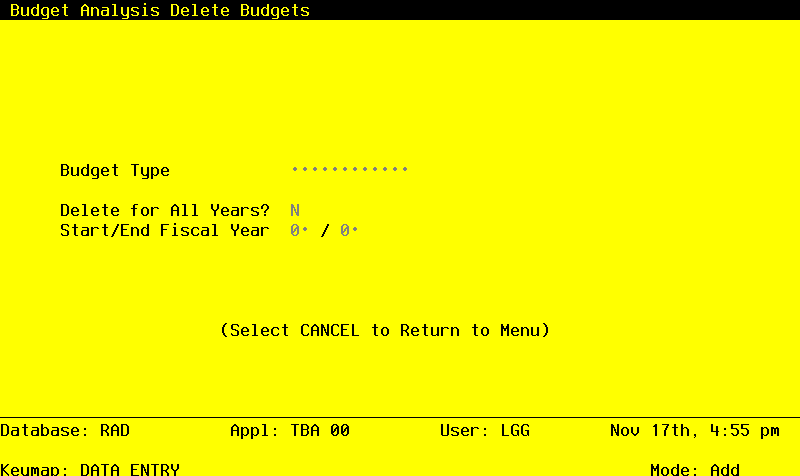
Data items for the preceding screen are described below:
- Budget Type
Alphanumeric, up to 12 characters Required Scan available
Supply the budget type of the budget records to be deleted. WARNING: If these Budget records are to be modified or renamed into another budget type, you must run the Copy Budgets utility before deleting these records.
- Delete for All Years?
Y or N Required
Indicate whether or not to delete the budget detail records with the specified budget type for all fiscal years currently on file.
- Start/End Fiscal Year
Positive number, up to 2 digits
If you entered ‘N’ for the ‘Delete for All Years?’ entry, then specify the first year of the range of years to be deleted and the last year of the range of years to be deleted. For example, if you want to delete the budget records for budget type “Version 1”, for years 1989 and 1990, then ‘89’ would be entered as the Start Year and ‘90’ would be entered as the End Year.
The entered data is validated. During validation, including access to other files, conditions may be found which cause messages to be displayed. Errors (E), Warnings (W), and Messages (M) that may result are shown below:
Press ENTER to display system-supplied information and then press ENTER again to save the information on this screen.
- Step 2In preparation for performing a sort/selection process on the Budgets information, this step provides sequencing of data records by Budget Type and Account, with no option to change the sequence at run time. Selection of data records is provided by Account and Account Component, with the option to enter user-specified comparisons at run time.
- Step 3This disposition type is used for all standard processing functions within General Ledger.
- Step 4According to previously specified criteria, this step actually performs the desired selection and/or sorting process.
- Step 5This step processes the information for Budgets and Budget Amounts. Records in the Budget Amounts and Budgets file will then be deleted.
- Step 6This step conditionally allows a job to branch forward or backward to any sequence number in the list of functions in the job.