
Chapter 5: Read APPX Data with Excel, Access and LibreOffice
Import COUNTRY into Access
This recipe creates a local copy in the Access database. Later APPX changes do not appear automatically in that copy.
- Open 32-bit Access, select Blank database, enter a filename such as
APPX-554-COUNTRY.accdb, and select Create. - Select External Data → New Data Source → From Other Sources → ODBC Database.
- Choose Import the source data into a new table in the current database and select OK.
- Select Machine Data Source, choose AppxODBC, and select OK.
- Enter the APPX user and password in the Dharma login dialog, keeping Host as the gateway computer, Database appx as its SQL dictionary, and Service empty (blank uses the default
sqlnwTCP-port lookup; details), then select OK.
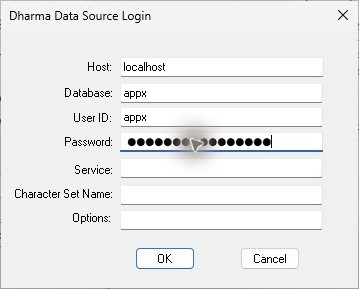
Leave Service empty, as pictured. The repeated native Access import passed with this edition's tested Dharma 14.01 x86 compatibility driver; all seven records and nine fields match the sample. Blank uses the default sqlnw lookup, reaching this gateway on TCP 1992. Database appx selects the SQL dictionary. Meaning of these fields.
- In Import Objects, select one
appx.dmo_dmo_countryentry and select OK. The table and its synonym can appear as two entries with the same displayed name; select one. - Wait for All objects were imported successfully, then select Close.
- Double-click
appx_dmo_dmo_countryin the Navigation Pane. It contains 7 records and 9 columns.

Verified result: all seven saved records and all nine columns match the native APPX sample. Fixed-width text can retain trailing spaces, and Access can sort names differently from the gateway. Compare records by name after trimming trailing padding. A local copy is not a live link.