
3File Maintenance
Option 2Sales Classes
Sales Class records are referenced during entries (in Commission Accounting, Accounts Receivable, and Order Entry) by the combination of salesperson and product class. For each such combination, this file identifies a default commission percentage and calculation method. These defaults are used for all entries that include the salesperson and any products in the product class.
If your salespeople are paid commissions based on line item amounts, you may choose to use this file.
Keep in mind, though, that you do not have to set up a record here for every combination of salesperson and product class. You simply will not have the defaults.
When you use this option, a record of all entries will be printed. For additions, all new field contents are printed; for deletions, the deleted record’s contents are shown; for changes, both old field contents and new field contents are shown; and, in all cases, the User ID, date, and time are printed.
Select “Sales Classes” from the File Maintenance menu. The Sales Classes entry screen appears below.
Sales Classes File Maintenance screen
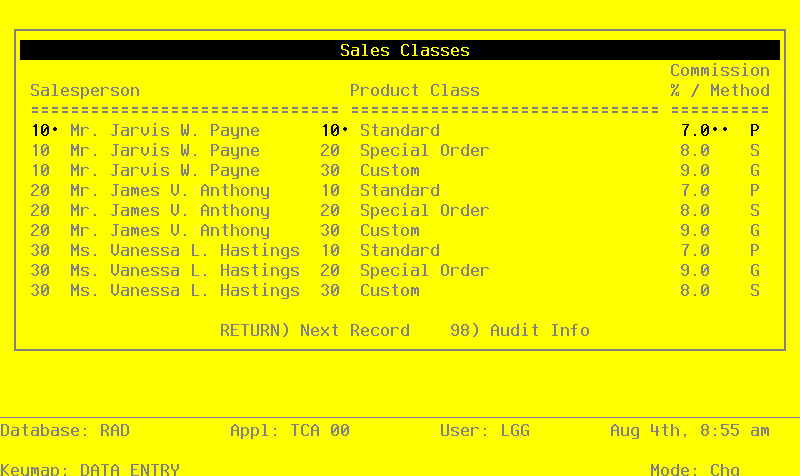
When the key value for a particular record is requested, you can review all the records in the file by selecting the Scan option. The records will be presented on an “Access” screen, and you will be allowed to scan the available data until you find the record you want. Then, position the cursor by that record and press RETURN; the record will be displayed for editing.
Data items for the preceding screen are described below:
- Salesperson
Enter a valid salesperson number from the Salespersons file. You can use the Scan option to find an appropriate entry. The system displays the corresponding salesperson name so that you can verify your entry.
- Product Class
Enter a product class number of up to three digits from the Inventory Control Product Class file. You can use the Scan option to find an appropriate entry. The system displays the corresponding product class description so that you can verify your entry.
If Inventory Control is not part of your system, you may designate a product class.
- Commission Percent
Enter up to three digits and one decimal for the percentage used to calculate commissions for this sales class. If the Commission Method entered on this screen is ‘P’, you can leave this field blank and the system will default 100%.
When commissions are calculated on the line item level in Commission Accounting, Order Entry, and Accounts Receivable, this field defaults based on the salesperson entered on the header record and the product entered on the line item record. This field will override the Commission Percent default established on the Salespersons record.
- Commission Method
Enter one of the following codes to identify the commission calculation method. Commissions are calculated as a percentage of the amount identified by the code. Valid codes and the amounts they identify are:
- S
- Selling price
- P
- Product commission amount from the Inventory Control Products file
- G
- Gross margin (the difference between selling price and cost)
When commissions are calculated on the line item level in Commission Accounting and Order Entry, this field defaults based on the salesperson entered on the header record and the product entered on the line item record. This field will override the Commission Method default established on the Salespersons record.
The entered data is validated. Press RETURN to save the information on this screen.
Select the Next Record option to go to the next Sales Classes record.
At this screen, the use of the MODE keys—ADD, DEL, CHG, or INQ—pertain to those records in the Sales Classes file.