
1Transaction Processing
Option 8Commissions Transfer
If your system includes Accounts Payable, the Commissions Transfer function can be used to create invoice entry records in Accounts Payable. The function uses data in the Unpaid Commissions file to create these entries. The payment code entered on each Salespersons record specifies whether data for that salesperson will be transferred to Accounts Payable.
An option in the Parameters file allows this function to be run automatically during Close Month processing. Another Parameters option determines whether detail or summary data is transferred:
- If detail is transferred, one invoice or time card entry is created for each Unpaid Commissions record to be paid.
- If summary data is transferred, one invoice or time card entry is created for each salesperson to be paid. The record includes a summary of all Unpaid Commissions records to be paid.
This function can only be used to transfer data from Unpaid Commissions records that have a “normal” or “pay now” payment status. (See the Descriptions file for an explanation of pay status codes.) For records with a “normal” payment status, the corresponding invoice in Accounts Receivable must be fully receipted.
Select “Commissions Transfer” from the Special Functions section on the Transaction Processing menu. The Commissions Transfer entry screen is shown below.
Commission Transfer screen
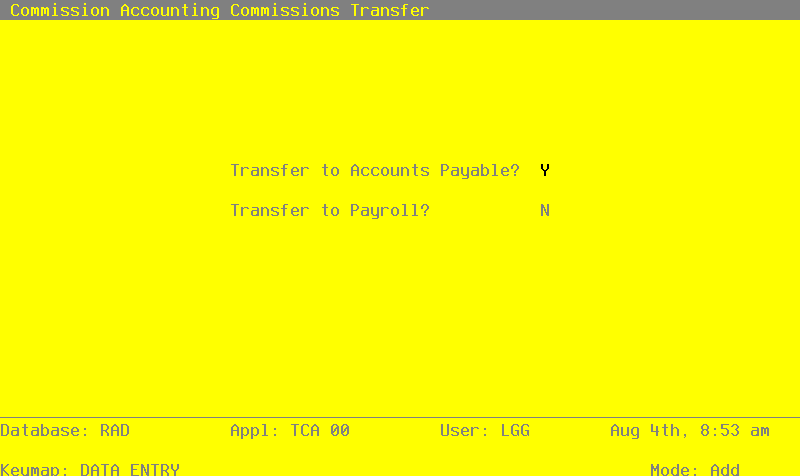
Data items for the preceding screen are described below:
- Transfer To Accounts Payable?
Enter ‘Y’ or ‘N’ to indicate whether or not to create invoice entries in Accounts Payable.
The entered data is validated. Press RETURN to save the information on this screen and run the Commissions Transfer function.