
Chapter 5: Read APPX Data with Excel, Access and LibreOffice
Connect LibreOffice Base and Save a COUNTRY Query
The Base document stores a connection and saved queries. It does not copy the APPX records into an embedded Base database. Use the existing shared SQL definitions from ASQL.
- Start the verified 32-bit LibreOffice Base. In Database Wizard, select Connect to an existing database, choose ODBC, and select Next.
- On Set up ODBC connection, select Browse, choose AppxODBC, and select OK. If the DSN is missing, check client bitness before creating another one.
- Select Next. Enter the authorized APPX user, select Password required, and select Next. Enter the password only when the connection prompts for it.
- Keep Yes, register the database for me and Open the database for editing selected. Leave Create tables using the table wizard unchecked. Select Finish and save APPX-553-COUNTRY.odb in a local working folder.
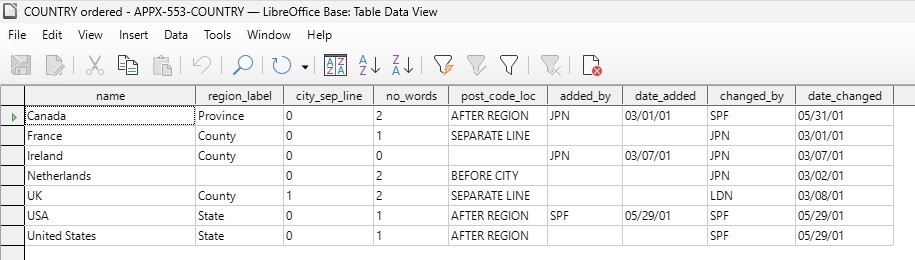
- Supply the APPX password in the Authentication Required dialog. Under Tables, expand appx and double-click dmo_dmo_country. The table view contains 7 records and 9 fields. Widen columns to read the complete values; a clipped display is different from truncated returned data.
- Close the table-data window. In the Base document, select Queries → Create Query in SQL View. Enter:
SELECT * FROM "appx"."dmo_dmo_country" ORDER BY "name"
- Select Edit → Run Query, or press F5. Check the seven records and all nine fields against the native sample.
- Select the query's Save button and name it COUNTRY ordered. Close the query-design window, then save the Base document itself.
- Reopen the Base document in the same 32-bit LibreOffice profile, open the saved query, supply the APPX password when prompted, and run it again. The reopened saved query returned all seven complete records. A saved query is a definition; the gateway and APPX server must be available when it runs.
Use the exact qualified lowercase identifiers shown. In the 5.5.1 test, the unqualified uppercase spelling was rewritten by Base's SQL handling and returned -20005 Table/View/Synonym not found. The explicit "appx"."dmo_dmo_country" form passed. This local saved query is distinct from creating a shared SQL view in the gateway dictionary. See the LibreOffice ODBC reference for the connection wizard.