
Chapter 2: Install and Check APPX ODBC
Install the 5.5.3 Gateway and ASQL
- Confirm that you can log into APPX 5.5.3 and open the DMO application. Record the APPX server name and login-manager port. This example uses
localhost:31054and the Windows login manager's Pipe interface. - Download the 5.5.3 gateway installer and the 5.5.3 driver and ASQL installer.
- Open Command Prompt in the download folder and verify each download with
certutil.exe -hashfile "filename.exe" SHA256.
| Download | SHA-256 |
|---|---|
AppxODBCserver_windows.exe | fc655f512746940e3eb02cd234ad4ee3549bb409e6339db80000d15f6aa4d1d9 |
AppxODBCdriver+ASQL_windows.exe | 7b6d67289a9b5e9ca0d5246311b62cec0e03f22e8fcf6daf3db5a2bbdb4e60d5 |
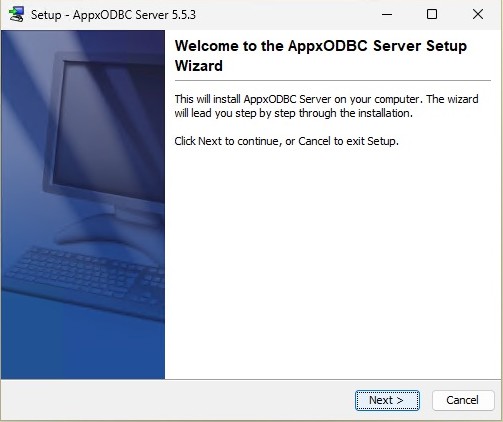
- Right-click the gateway installer and choose Run as administrator. Select Next on the 5.5.3 welcome page and keep the default installation directory,
C:\Program Files (x86)\AppxODBCserver.
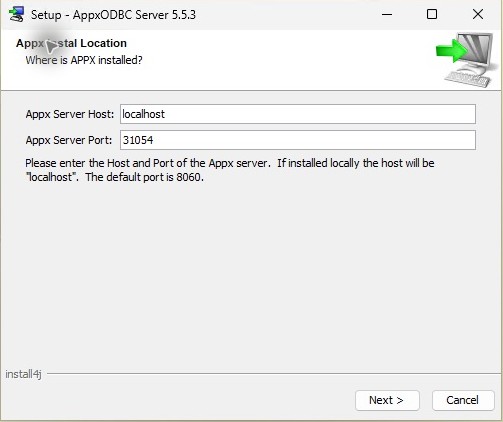
- Enter the APPX server's hostname and login-manager port. For this example, enter
localhostand31054, then complete the wizard.
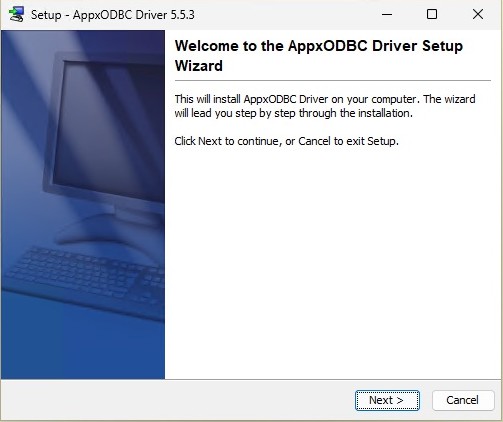
- On the designated ASQL administration computer, install the 5.5.3 driver and ASQL package as administrator, keeping
C:\Program Files (x86)\AppxODBCDriver. Keep this version of ASQL Dictionary Importer for Import COUNTRY with ASQL. Follow Install the 6.2.1 Client Driver to extract the 6.2.1 client driver and update the defaultAppxODBCDSN.
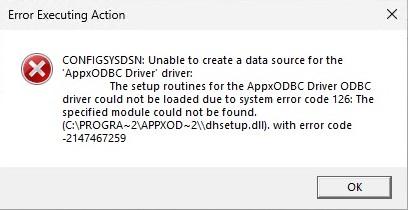
- Install the Microsoft x86 runtime, then start and check the gateway. Apply additional package repairs only if that check fails. If optional DSN creation displays the following error, follow Resolve System DSN Error 126 before reopening the setup dialog:
Error Executing Action

CONFIGSYSDSN: Unable to create a data source for the
'AppxODBC Driver' driver:
    The setup routines for the AppxODBC Driver ODBC
 driver could not be loaded due to system error code 126: The
 specified module could not be found.
 (C:\PROGRA~2\APPXOD~2\\dhsetup.dll). with error code
 -2147467259
The client-driver recipe extracts selected DLLs from the 6.2.1 package without running its installer. It keeps the 5.5.3 gateway, matching ASQL and existing appx dictionary. Test any changes on a copy of an existing production installation first.