
Chapter 2: Initial Setup File Maintenance
Option 2Descriptions
The Descriptions file is used to maintain specific transaction and freight descriptions to be associated with system-assigned codes. Default descriptions are provided in this master file and are displayed on various entry records and reports. You may change these descriptions; however, the meaning associated with each type cannot be changed.
Select “Descriptions” from the File Maintenance menu. The Descriptions screen is shown below:
Descriptions screen
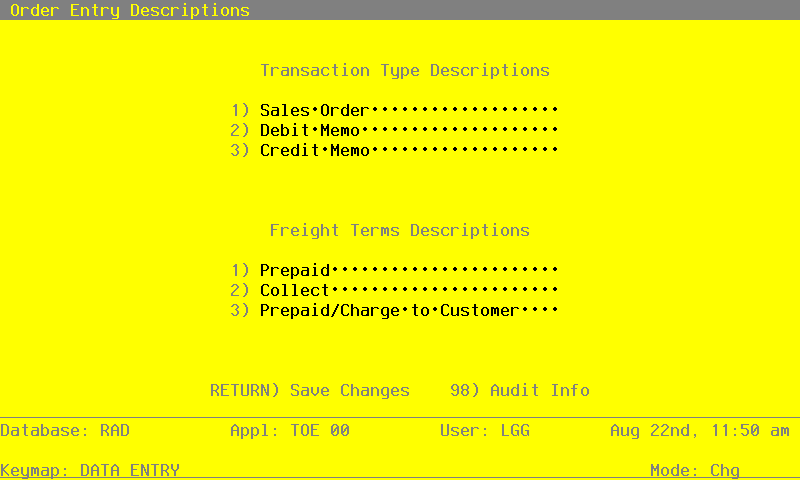
Data items for the preceding screen are described below:
- Transaction Type
The system displays three transaction types and defaults descriptions for each type. You can enter a different description of up to 11 characters. The system sorts through transactions based on this type for reporting purposes. Listed below are standard descriptions and an explanation of each transaction type. You may change any of these descriptions; however, the meaning of the code will not be changed. For example when you assign a transaction type of ‘1’ to an entry, the system assumes it to be a “sales order.”
Description Explanation
1) Sales Order The transaction is entered as a sales order through Order Entry.
2) Debit Memo The transaction reflects a debit memo.
3) Credit Memo The transaction reflects a credit memo.
- Freight Terms
The system displays a description of the freight payment terms. You can enter a different description of up to 26 characters.
During Sales Orders entry you will be asked to specify freight terms for orders. Although this field is always required, keep in mind that it is for your information only.
Listed below are standard descriptions and an explanation of each freight term. You may change any of these descriptions; however, the meaning of the code will not be changed. For example when you assign freight terms of ‘1’ to an entry, the system assumes it to be a prepaid order.
Description Explanation
1) Prepaid The order is to be shipped at your expense.
2) Collect Payment for the shipped order is to be collected upon arrival.
3) Prepaid The order is to be prepaid and billed to the customer’s account. /Charge to Customer
The entered data is validated. Press RETURN to save the information on this screen.