
Chapter 4: Recovery Processing
Option 3Parameters
This function allows entry and maintenance of the Parameters file.
Select “Parameters” from the Recovery Processing menu. Here is the Parameters screen:
Recovery Processing Parameters screen
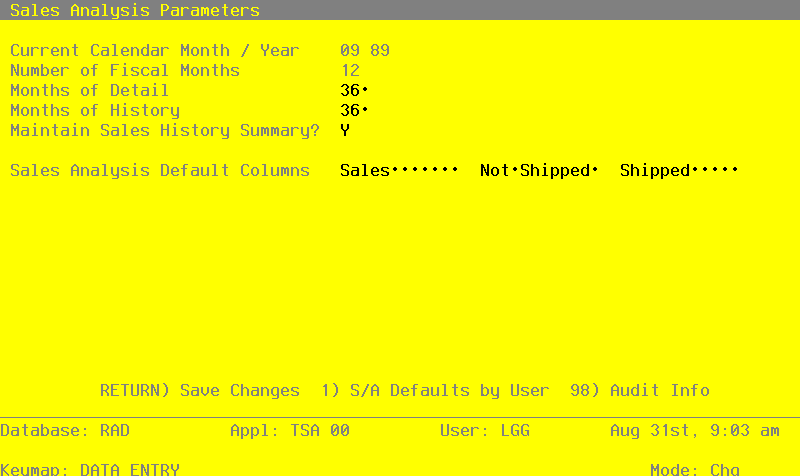
Data items for the preceding screen are described below:
- Calendar Month/Year
Enter the current calendar month and year.
- Number of Fiscal Months
Enter ‘12’ or ‘13’ to specify the number of periods in the fiscal year.
- Months of Detail
Enter the number of months of sales detail to keep on file. After the system reaches this number, the detail records for the oldest month are deleted during Close Month processing in Live Operations. This number should be at least twice the number of fiscal months so that “last year” and “this year” history is available for reporting.
- Months of History
Enter the number of months of sales history to keep on file. After the system reaches this number, the records for the oldest month are deleted during Close Month processing in Live Operations. This number should be at least twice the number of fiscal months so that “last year” and “this year” history is available for reporting.
- Maintain Sales Summary?
This flag controls posting of Sales History to the Sales Analysis Inquiry database. Posting sales history to the Sales Analysis database must be done if you intend to use the Sales Inquiry process.
- Sales Analysis Default Columns
Select the default columns for the Sales Analysis Inquiry. These defaults are used when there are no User defaults defined for the current user. Use SCAN to select from the list of available columns.
The entered data is validated. Press RETURN to save the information on this screen.
Please note that Option 1 is available at the bottom of this screen.
Option 1 - Sales Analysis Defaults by User
Recovery Processing Defaults by User screen
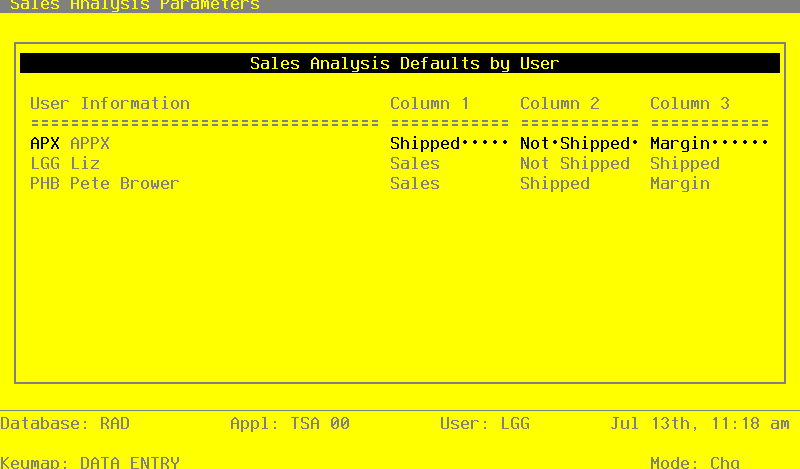
The following fields are contained on the Sales Analysis Defaults by User screen:
- User Information
The system displays three charaters and a description for each user.
- Column 1
Select the default columns for the Sales Analysis Inquiry. These defaults are used for this user only and override the general defaults.