
Chapter 4: Recovery Processing
Option 2Sales History
This function allows access to the Sales History files.
Here is the Sales History screen:
Recovery Processing Sales History screen
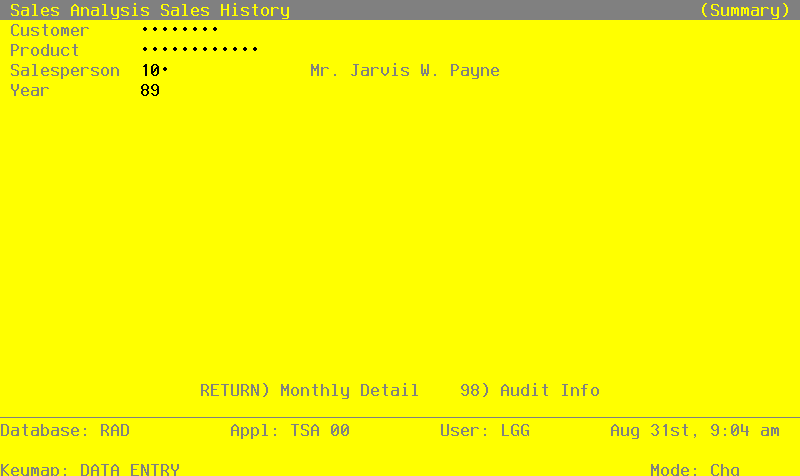
When the key value for a particular record is requested, you can review all the records in the file by selecting the Scan option. The records will be presented on an “Access” screen, and you will be allowed to scan the available data until you find the record you want. Then, position the cursor by that record and press RETURN; the record will be displayed for editing.
Data items for the preceding screen are described below:
- Customer
Enter a code to identify the customer for whom the Sales History record is to be maintained. You can use the Scan option to find an appropriate entry. If your system includes the Accounts Receivable application, this number must be on file in the Customers file. The system displays the customer’s name so that you may verify your entry.
If the Sales History record is not to be identified by a single, unique customer, leave this field blank.
- Product
Enter a code to identify the product for which the Sales History record is to be maintained. You can use the Scan option to find an appropriate entry. If your system includes the Inventory Control application, this number must be on file in the Products file. The system displays the corresponding description so that you may verify your entry.
If the Sales History record is not to be identified by a single, unique product, leave this field blank.
- Salesperson
Enter a code to identify the salesperson for whom the Sales History record is to be maintained. You can use the Scan option to find an appropriate entry. If your system includes the Commission Accounting application, this number must be on file in the Salespersons file. The system displays the salesperson’s name so that you may verify your entry.
If the Sales History record is not to be identified by a single, unique salesperson, leave this field blank.
- Year
Enter 2 digits for the calendar year to which the following monthly sales records apply.
The entered data is validated. Press RETURN to save the information on this screen.
Select Next Record to go to the next Sales History record.
At this screen the use of the MODE keys—ADD, DEL, CHG, or INQ—pertain to those records in the Sales History file.
For each month of the year, enter the following line item information for this customer/product/salesperson. A sample line item screen is shown below:
Recovery Processing Sales History by Month screen
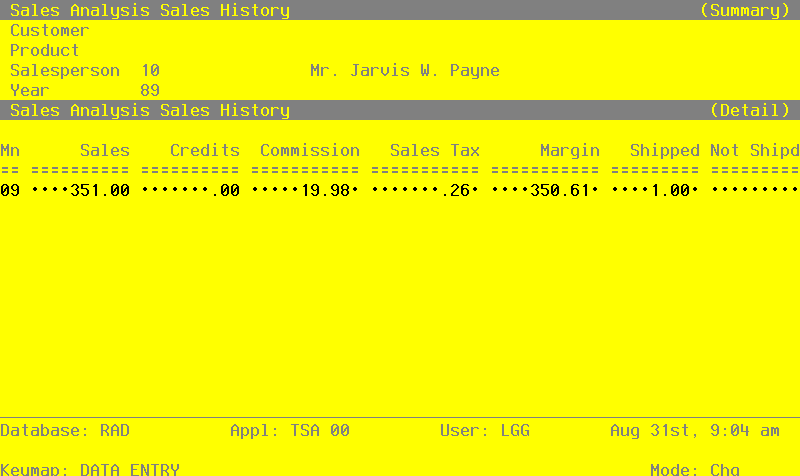
Data items for the preceding screen are described below:
- Month
Enter 2 digits to identify the calendar month to which this sales record applies.
- Sales
Enter up to 7 digits and 2 decimals for the total, gross sales figure for this customer/product/ salesperson combination.
- Credits
Enter up to 7 digits and 2 decimals for the total amount of credits issued to this customer/ product/salesperson combination.
- Commission
Enter up to 7 digits and 2 decimals for the total commissions earned by this customer/product/ salesperson combination.
- Sales Tax
Enter up to 7 digits and 2 decimals for the total amount of sales tax paid on sales to this customer/product/ salesperson combination.
- Margin
Enter up to 7 digits and 2 decimals for the total margin (sales minus cost) for this customer/ product/salesperson combination.
- Shipped
Enter up to 5 digits and 2 decimals for the total number of stockkeeping units shipped for this customer/product/ salesperson combination.
- Not Shipped
Enter up to 5 digits and 2 decimals for the total number of stockkeeping units ordered — but not shipped — to this customer/product/salesperson. “Not shipped” orders (that is, orders which were neither filled, nor backordered) represent lost sales.
The entered data is validated. Press RETURN to save the information on this screen.
Select the Previous Image option to go back to the Sales History screen. Select the Next Record option to go to the next Sales History by Month screen. Select the END option to go to the next Sales History screen.
At this screen the use of the MODE keys—ADD, DEL, CHG, or INQ—pertain to those records in the Sales History by Month file.