
1Initial Setup File Maintenance
Option 1Parameters
The Parameters file defines important system-wide options and requirements that affect the operation of your application. The information in this file specifies how long detail sales and sales history information is to be stored in system-maintained files. It also includes the current calendar month and year, and the number of accounting periods in your fiscal year.
Select “Parameters” from the File Maintenance menu. Here is the Parameters screen:
Initial Setup Parameters screen
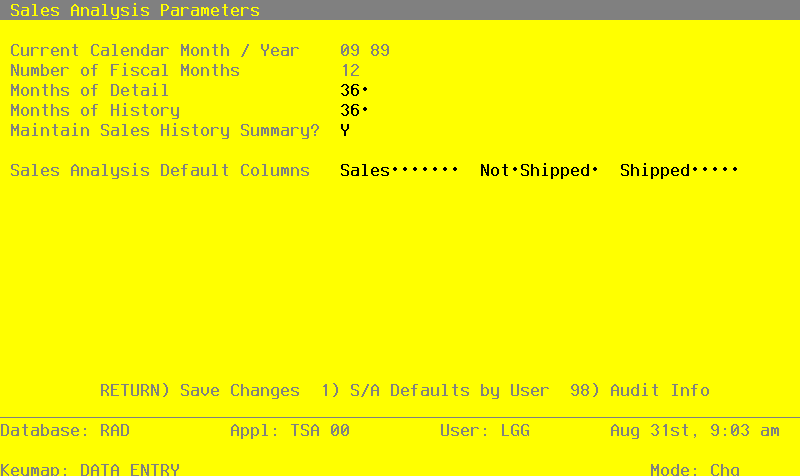
Data items for the preceding screen are described below:
- Calendar Month/Year
Enter the current calendar month and year.
- Number of Fiscal Months
Enter ‘12’ or ‘13’ to specify the number of periods in the fiscal year.
- Months of Detail
Enter the number of months of sales detail to keep on file. After the system reaches this number, the detail records for the oldest month are deleted during Close Month processing in Live Operations. This number should be at least twice the number of fiscal months so that “last year” and “this year” history is available for reporting.
- Months of History
Enter the number of months of sales history to keep on file. After the system reaches this number, the records for the oldest month are deleted during Close Month processing in Live Operations. This number should be at least twice the number of fiscal months so that “last year” and “this year” history is available for reporting.
The entered data is validated. Press RETURN to save the information on this screen.