
Chapter 2-3: Domains
Numeric Domains
A numeric domain is restricted to number, decimal, and sign (-) entries. Examples include amounts, prices, and quantities.
The Numeric Domains overlay, shown in Figure 2-3-16, displays after you complete the entries on the Domains specifications screen if the Type you select is NUMERIC.
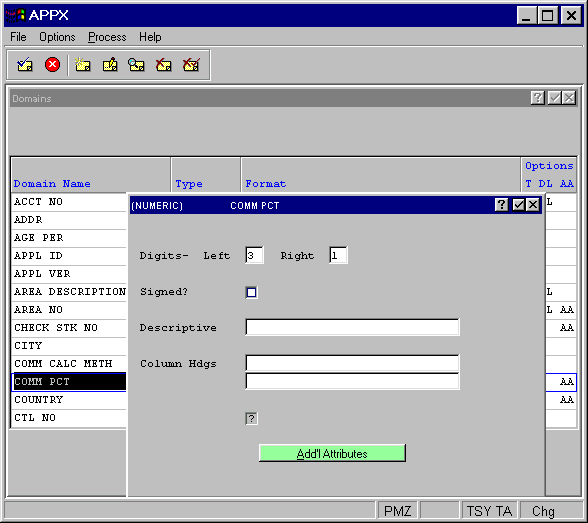
The Numeric domains overlay contains the following fields:
- Digits — Left. Enter the number of digits to the left of the decimal.
- Digits — Right. Enter the number of digits to the right of the decimal.
- Signed?
Specifies whether the numbers entered in this domain are positive or negative. A “no”
 would ensure that only positive numbers are entered. The default is “no”.
- Descriptive
Provides a longer, more easily understood alternative to Domain Name, one that is not required to be unique within an application. If blank at all default levels, Domain Name is used.
- Column Hdgs
Designates up to two lines of column heading text. The APPX output process facility uses this text to generate standard column heading images for Start of Page and Start of Range class frames. For cosmetic reasons, the length of headings should not exceed the length of a domain itself. Refer to Standard Column Heading Image for additional information.
- Auto Seq?
Click the checkbox to toggle between “yes”
 if this numeric domain represents a sequence number with a value that should be maintained by APPX and “no” if it does not.
For Numeric domain type, the following option is available as described in the corresponding section: