
Chapter 2-5: Work Fields
Introduction to Work Fields
Work fields are temporary fields that are not maintained in a file, but can be manipulated by processes in APPX (usually through the use of statements). They are used to display values that are not stored, such as a calculated line item amount (quantity multiplied by price) or a constant value like π (pi). A work field value is available in memory to a user.
The Work Fields screen, shown in Figure 2-5-1, displays attributes that are common to all work fields, regardless of type (alphanumeric or date, for example). You access this screen by selecting the work fields option from the Database Management menu overlay.
Work Fields screen
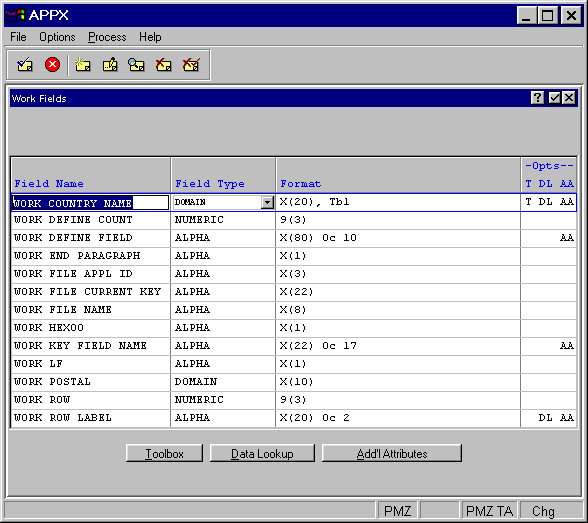
The Work Fields screen contains the following fields:
- Field Name
Uniquely identifies individual work fields within an APPX application. Work fields are referenced by their Field Name throughout application design.
- Field Type
Categorizes fields according to their function within APPX. The specifications that are presented on subsequent screen overlays depend on the Field Type entered here. The Field Type options are:
- Domain
Assumes the attributes that are defined for an alpha, date, logic, or numeric work field.
- Alpha
Work fields may contain numbers, letters, and special characters (-, #, or &, for example).
- Format
Work fields may contain an edit mask.
- Text
Work fields may contain text.
- Token
Work fields use specific values that are stored as corresponding numbers.
- Numeric
Work fields are restricted to number, decimal (.), and sign (-) entries.
- Date
Work fields may contain dates and/or times, from a hundredth of a second through a century.
- Logic
Work fields have possible values of yes
 , no
, no  , or
, or  to represent an unknown value.
There are three options available from the Work Fields screen: Toolbox, Data Lookup, and Additional Attributes.