
Chapter 2-5: Work Fields
Text Work Fields Additional Attributes
From the Text work field overlay, you have an additional attributes option. The Text work field Additional Attributes overlay is shown in Figure 2-5-17.
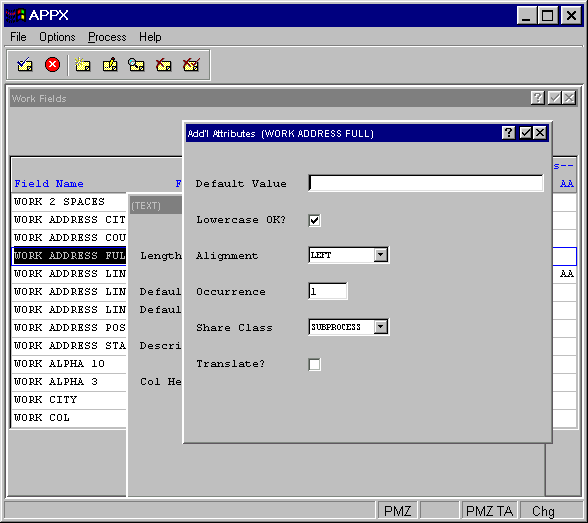
The Text Work field Additional Attributes Overlay contains the following fields:
- Default Value
Establishes a modifiable starting value for all image items whenever they are first displayed in add mode in an input image, unless modified by a user. If blank, there is no starting value displayed on the image.
- Lowercase OK?
Indicates whether or not a modifiable item on an interactive screen can be entered in upper- and lowercase letters. If “no”
 , the entry is stored and displayed exclusively as uppercase, regardless of how a user enters the information. This entry does not affect statements. A lowercase value established with a statement displays as lowercase, even if this specification prohibits lowercase entries. The default is “yes”
  .
.- Alignment
Determines whether or not data in a field is aligned for storage and/or display and, if so, the type of alignment. The Alignment options are NONE, LEFT, JUSTIFIED, RIGHT and CENTERED. The default is NONE.
- Occurrence
Determines the number of times a field is present in a record. If blank, APPX assumes a value of 1. This field may contain up to five numeric characters and is restricted to a maximum of 32,767. See the Occurrence section for a more comprehensive discussion of this field.
Defines the level values contained in this work field can be shared. Options are:
- SUBPROCESS — The values can be shared between a process and its subprocesses.
- RELATED — The values can be shared among related processes in a job.
- DETACHED — The values are available until the user logs off.
- NOT SHARED — The values are available only for the current process.
- The default is SUBPROCESS.
- Translate?
Indicates if the value of the work field should be translated into a designated language if APPX’s Language Translation feature is being used. Since there is no validation table for a text field, it is the designer's responsibility to ensure that a translatable text work field is read only. Click the checkbox to toggle between “yes”
, “no” , and unknown  values. If the translation feature is not in use, retain the default value of .