
Chapter 3-4: Menu Processes
Menu Process Specifications
Menu processes specifications establish the general attributes of a menu process. The Menu Processes screen, shown in Figure 3-4-1, is displayed when you select menus from the Application Design Specifications Menu.
Menu Processes screen
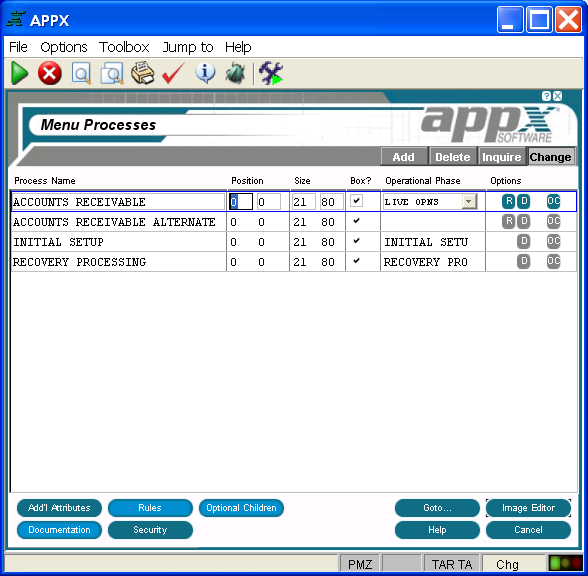
The Menu Processes screen contains the following fields:
- Process Name identifies a specific process and consists of up to 30 uppercase alphanumeric characters that must be unique within type and application.
- Position fields contain up to three numeric characters each and determine the placement of the rows and columns of a frame relative to the rows and columns on the screen display. Row entries designate positioning relative to the top of the screen. Column entries designate positioning relative to the left of the screen. The default is 1, 1. See Frame/Image Positioning in Chapter 3-2 for more information.
- Size fields, which consist of three numeric characters each, designate the number of rows and columns that comprise the displayed frame. This size may be greater than the size of the screen if panning capabilities are desired. The default is 21, 80.
- Box?, represented by “yes”
 or “no”
  , indicates whether or not APPX draws a box around an image before it displays to a user. The border does not consume rows or columns within the space that is defined for the frame/image, but does consume space on the screen. The default is “no” and the value can be toggled by clicking the checkbox.
 - Operational Phase allows you to enter the appropriate operational phase, if the currently selected menu is the main menu for one of the three operational phases. Valid entries are:
INITIAL SETUP
LIVE OPNS
RECOVERY PROC
- Options are indicators that are present whenever the options they denote have been defined. Options applicable to this screen are
 (Additional Attributes),
  (Rules),
  (Documentation),
  (Security), and
  (Optional Children).
Buttons are provided at the bottom of each Menu Processes screen for accessing the following options:
- additional attributes - Same as the Process Additional Attributes Option described in Chapter 3-3.
- rules - See the Menu Process Rules Option for details.
- documentation - Same as the Process Documentation Option described in Chapter 3-3.
- security - Same as the Process Security Option described in Chapter 3-3.
- optional children - See the Menu Process Optional Children Option for details.
- goto... - Allows you to identify and retrieve another record by optionally entering a full or partial key.
- image editor - See Menu Image in the Image Editor for details. This is the default option.
- help - Allows you to view online help text for a selected item.
- close or cancel - In Inquire mode, close allows you to end the current process. Otherwise, cancel allows you to end the current process without saving changes, if any, to the current record.
In addition, the menu bar provides the following pulldown menus:
- Toolbox - Same as the Process Toolbox Pulldown Menu described in Chapter 3-3.
- Jump to - Same as the Process Jump to Pulldown Menu described in Chapter 3-3.