
Chapter 2-5: Work Fields
Token Work Fields Token Table
token table accesses the Token Table overlay, shown in Figure 2-5-19. A token table provides an alternative to the use of range checks for data token.
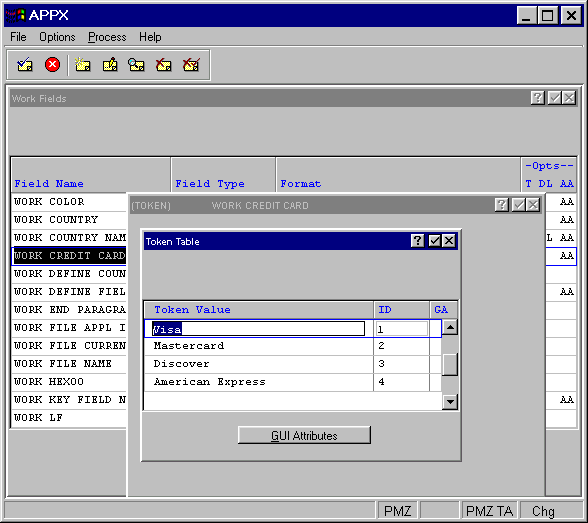
You can establish a token table for any Token work field in the data dictionary. The entries in the table are case-sensitive. If you enter a token value in all capital letters, an application user must enter the value in all capital letters.
Token table operations are database-independent. They access a designer-defined table in application design, not data contained in a file in a database, for the range of possible values. As a result, token does not vary from database to database. It is automatically available to, and exactly the same for, every database that is associated with an application.
The Token Table overlay contains the following fields:
- Token Value
Is the alphanumeric value associated with the token ID. APPX automatically translates between token values and ID's whenever necessary. This entry is case-sensitive. If entered in capital letters, an application user must also enter the value in capital letters.
- ID
Displays a unique number that is defaulted by APPX. This specification establishes the binary value that APPX stores in place of the associated token value. APPX assigns the first token value an ID of 1, with additional values assigned an ID that is equal to the highest existing ID plus 1. The default can be overridden, but must be unique within a table. APPX does not require that ID's be contiguous within a table.
The token Table overlay contains this option:
- The gui attributes option is used to access the Graphical Attributes overlay and define graphical attributes for this Token Table. See the Defining Graphical Attributes For Validation and Token Table Entries section in Chapter 3-17, Graphical Attributes.