
Chapter 2-5: Work Fields
Numeric Work Fields
A numeric work field is restricted to number, decimal, and sign (-) entries. Examples include amounts, prices, and quantities.
The Numeric work fields overlay, shown in Figure 2-5-21, permits you to add numeric-specific attributes to those already defined for the work field. It automatically displays after you complete the entries on the Work fields specifications screen if the Field Type you select is NUMERIC.
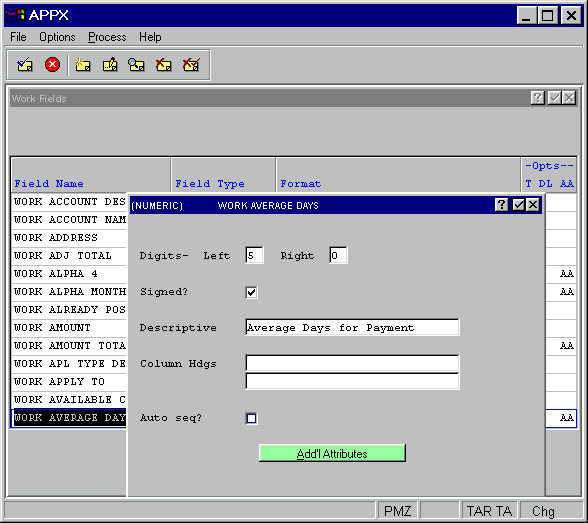
The Numeric work fields overlay contains the following fields:
- Digits — Left. Enter the number of digits to the left of the decimal.
- Digits — Right. Enter the number of digits to the right of the decimal.
- Signed?
Specifies whether the numbers entered in this field are positive or negative. A “no”
 would ensure that only positive numbers are entered. The default is “no”.
- Descriptive
Provides a longer, more easily understood alternative to Field Name, one that is not required to be unique within an application. If blank at all default levels, Field Name is used.
- Column Hdgs
Designates up to two lines of column heading text. The APPX output process facility uses this text to generate standard column heading images for Start of Page and Start of Range class frames. For cosmetic reasons, the length of headings should not exceed the length of a field itself. Refer to Standard Column Heading Image for additional information.
- Auto Seq?
Select "yes"
 if this numeric field represents a sequence number with a value that should be maintained by APPX. Click the checkbox to toggle between “yes” and “no” . Note that Auto Seq? only appears if the numeric field has no decimal places.
From the Numeric work fields overlay, you can select the additional attributes overlay, shown in Figure 2-5-22.
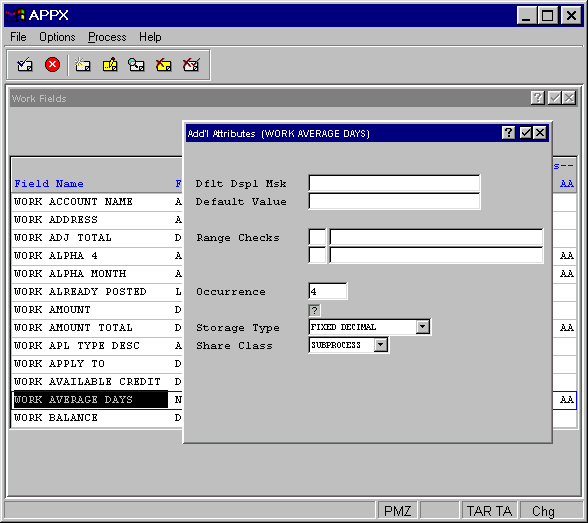
The numeric work fields Additional Attributes overlay contains the following fields:
- Dflt Display Msk
Designates the format that the data displays to a user in an APPX image. This entry establishes the Display Mask default for all image items that reference the numeric field. If blank, APPX uses a display of nonfixed leading spaces with one significant digit. Refer to the Numeric Domains section in Chapter 2-3 for additional information about this entry.
- Default Value
Establishes a starting value for all image items whenever they first display in add mode in an input image, unless modified by a user. If blank, the starting value is assumed to be the null value.
- Range Checks
Defines a series of allowable values that APPX uses for online data validation. The first component represents the relation. The options are EQ (equal to), NE (not equal to), GT (greater than), LT (less than), GE (greater than or equal to), and LE (less than or equal to). The second component represents the value that is assigned to the relation. If you enter two relations, APPX infers an AND relationship.
- Occurrence
Determines the number of times a field is present in a record. If blank, APPX assumes a value of 1. This field may contain up to five numeric characters and is restricted to a maximum of 32,767. See the Occurrence section for a more comprehensive discussion of this field.
- Storage Type
Determines the internal storage format for data. The Storage Type options are:
- BINARY — The number is stored in binary form. The high order bit determines the sign: on or 1 for positive, and off or 0 for negative. The decimal position is established by the Decimals — Left/Right entries.
- FIXED DECIMAL
Employs a packed decimal format that stores two decimal digits for each byte with the exception of the last bit, which is the sign bit. The decimal position is established by the Decimals — Left/Right entries.
- FLOATING DECIMAL
Employs a combination of binary and packed decimal formats that always requires a total of nine bytes of storage. The first 15 digits are stored as packed decimal with two decimal digits for each byte (for a total storage requirement of eight bytes). The final byte (binary) determines the maximum number of digits that currently appears to the right of the decimal.
- The default is FIXED DECIMAL. For a comprehensive discussion of these options, see Numeric Storage Types in Chapter 2-3.
Defines at what level the values contained in this work field can be shared. The Share Class options are:
- SUBPROCESS — The values can be shared between a process and its subprocesses.
- RELATED — The values can be shared among related processes in a job.
- DETACHED — The values are available until the user logs off.
- NOT SHARED — The values are available only for the current process.
- The default is SUBPROCESS.