
Chapter 3-9: Query Processes
Query Process Specifications
Query process specifications establish the general attributes of a query process, including a process control file (PCF), and operational parameters.
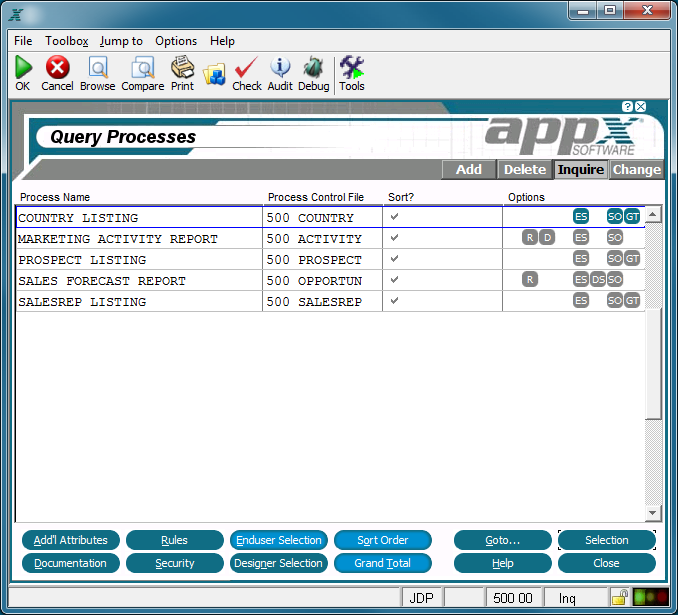
Query Processes Screen
The Query Processes screen, shown above, contains the following fields:
Process Name identifies a specific process and consists of 30 uppercase alphanumeric characters that must be unique within type and application.
Process Control File identifies a file by application ID and file name that is to be automatically managed by APPX during the execution of this process. APPX automatically reads the process control file (PCF) during query process execution.
Sort? allows you to explicitly specify whether or not the sort order is displayed to the user. The default is 'yes'  .
.
Options are indicators that are present whenever documentation (T), rules (R), enduser selections (ES), designer selections (DS), sort order (SO), or grand totals (GT) have been defined for this process.
The following options as described in the corresponding sections are available from the Query Processes screen:
Selection - Select the current Process.
Help - Allows you to view online help text for a selected item.
Close or Cancel - In Inquire mode, Close allows you to end the current process. Otherwise, cancel allows you to end the current process without saving changes, if any, to the current record.
In addition, the menu bar provides the following pulldown menus:
Toolbox - Same as the Process Toolbox Pulldown Menu
Jump to - Same as the Process Jump to Pulldown Menu