
Chapter 3-1: Overview of APPX Processes
Event Points
Defining an APPX application is essentially nonprocedural; you complete specifications to determine what is to be accomplished, not how it is accomplished. Nonprocedural specifications can be said to satisfy the data processing requirements that are imposed by routine business operations.
To respond effectively to nonstandard requirements, APPX integrates high-level procedural code, or statements, located in the integrated language facility (ILF). APPX’s statements are a set of keywords entered through a specialized editor to enforce syntax. Refer to Part 4 of this manual for a discussion of APPX’s integrated procedural language.
You can insert this procedural code into the execution sequence of a process at various times through event points. The event point, an example of which is shown in Figure 3-1-6, provides an opportunity to insert procedural code into the execution of the process. Each event point can contain a sequence of statements that are executed at a specific, predetermined point within each APPX process to address the required specialized task. Commonly used groups of statements can also be defined once in a subroutine process, and then accessed by an event point or executed as an optional or automatic child.
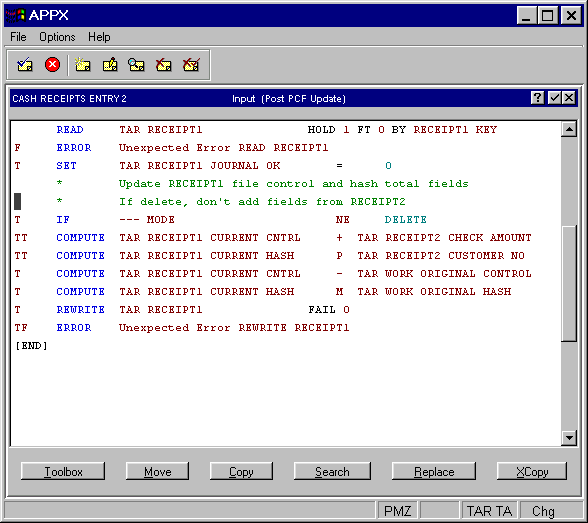
There are a number of APPX event points, each of which provides access to a process at a specific point in its execution sequence. They exist at four levels: process, frame, image, and child invocation. In addition, each type of process has a slight variation in the specific event points it includes at each level. Table 3-1-3 summarizes the event points that execute for each process type.
Refer to Chapter 3-16: Using Event Points for general information about each event point, including a definition and the chronology according to which it executes.
| Event Point | Menu | Job | Input | Output | Update | Query | Inquiry | Status | Subr |
|---|---|---|---|---|---|---|---|---|---|
| Process-Level | |||||||||
| Start of Process | Yes | Yes | Yes | Yes | Yes | Yes | Yes | Yes | Yes |
| Set Run-Time Defaults | Yes | ||||||||
| Post PCF Read | Yes | Yes | Yes | ||||||
| Pre-PCF Update | Yes | ||||||||
| Post PCF Update | Yes | ||||||||
| Pre-User Selection | Yes | ||||||||
| Post User Selection | Yes | ||||||||
| Start of Query Execution | Yes | ||||||||
| End of Query Execution | Yes | ||||||||
| End of Process | Yes | Yes | Yes | Yes | Yes | Yes | Yes | ||
| Frame-Level | |||||||||
| Start of Frame | Yes | Yes | Yes | Yes | |||||
| Select Image | Yes | Yes | Yes | ||||||
| Global Pre-Display | Yes | Yes | Yes | ||||||
| Global Option Intercept | Yes | Yes | |||||||
| End of Frame | Yes | Yes | Yes | ||||||
| Image-Level | |||||||||
| Pre-Display | Yes | Yes | Yes | Yes | |||||
| Pre-Display Verify | Yes | Yes | |||||||
| Option Intercept | Yes | Yes | Yes | ||||||
| Verify | Yes | Yes | |||||||
| Child-Level | |||||||||
| Pre-Invocation | Yes | Yes | Yes | Yes | Yes | Yes | |||
| Post Invocation | Yes | Yes | Yes | Yes | Yes | Yes |